
In Part 2 of this series, practical application was discussed in detail. Strategies for setting and maintaining alarms were discussed, along with some common pitfalls to watch out for. In the part of the series, examples of real world alarms will be displayed along with some final tips on which approach may work best for you.
How Alarms are typically displayed
To help make sense of the many ways alarms can be displayed and represented, here are a few screen shots to get you to notice some of the benefits.
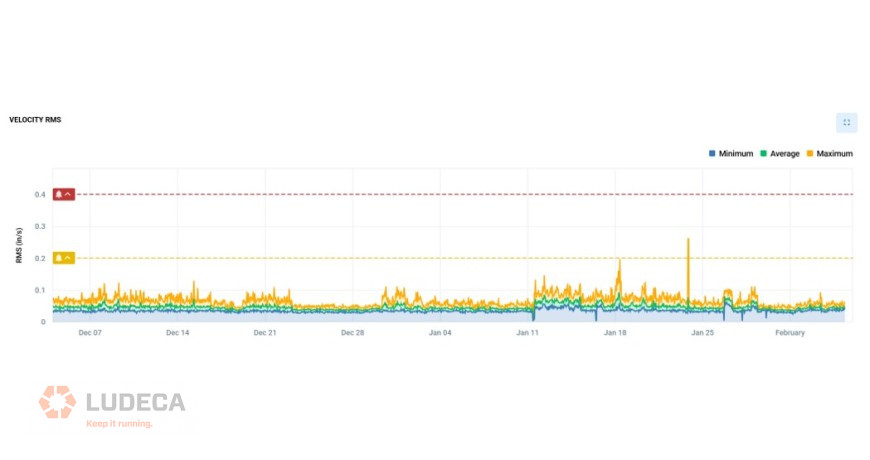
The image below shows a simple plot taken from Sensoteq’s Analytix software. The plot shows overall velocity data coming from a wireless triaxial sensor. Notice the warning and critical alarm levels. These alarms can be quickly broadcast to an entire database and then fine-tuned by clicking and dragging to adjust.
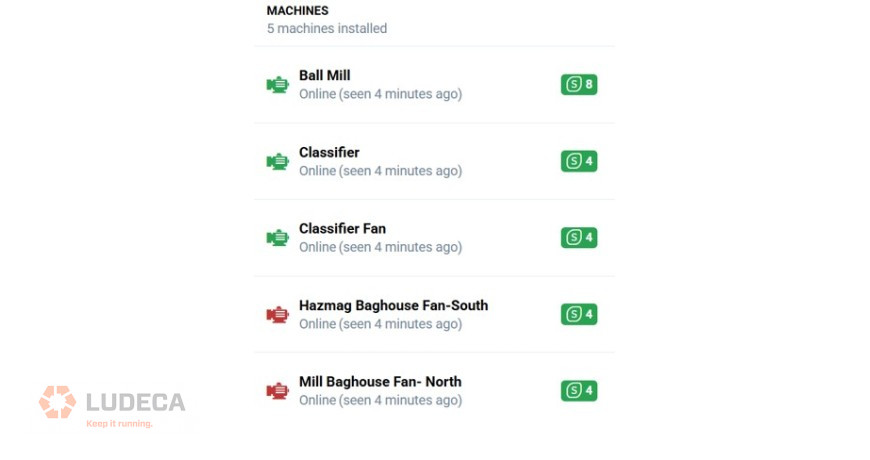
The screenshot below shows a simple list of machines in Senoteq’s Analytix software. The list is colored according to alarm status. In this case we may decide to skip over the green machines and focus on the yellow and red ones.
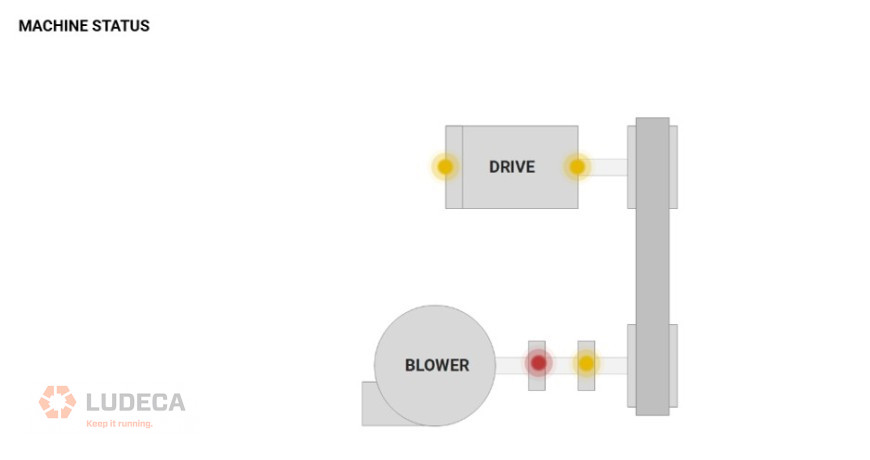
After clicking on a red machine, we can see the alarm status of each individual sensor. As you can see, three of the sensors are in “Warning Alarm” and one sensor is in “Critical Alarm”.
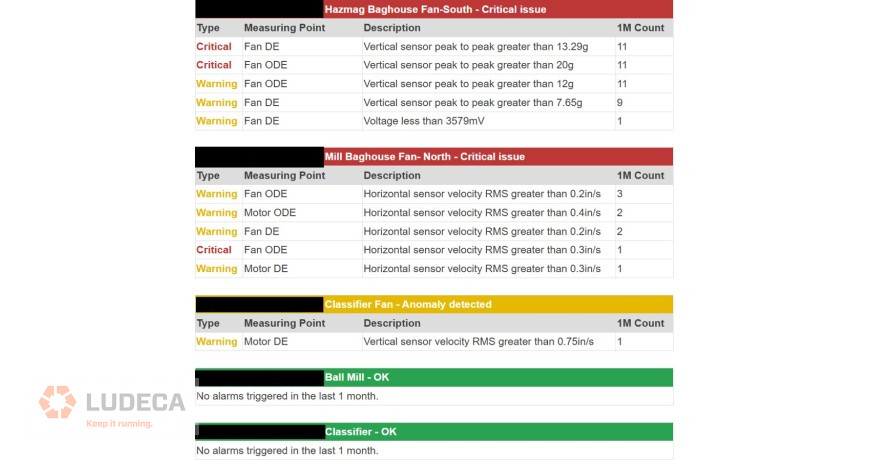
A simple report can be generated to display the alarm status of all equipment in a list form.
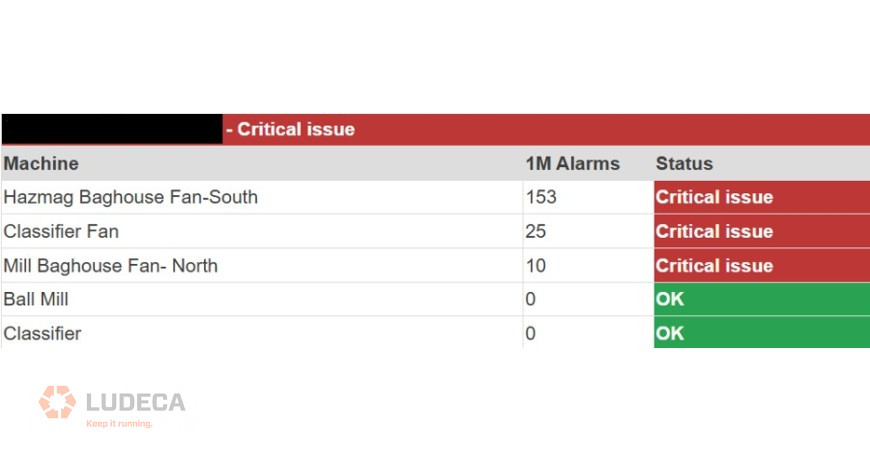
A more detailed explanation of alarm activity over a given period can be generated as well.
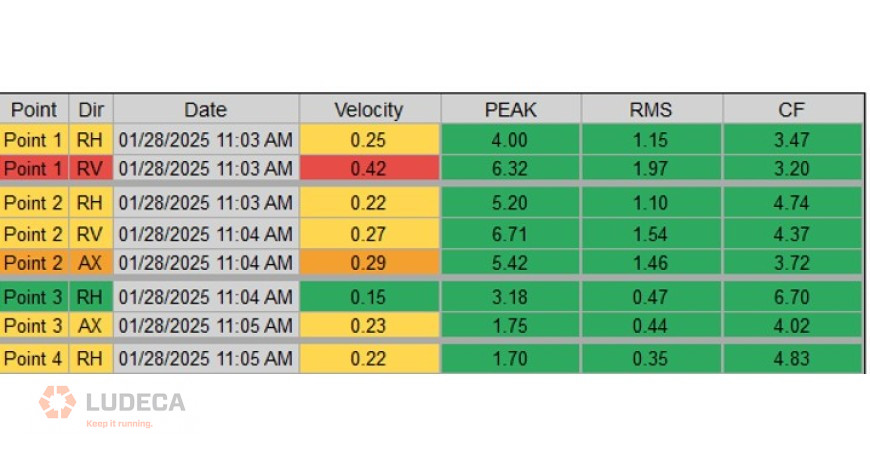
The dashboard below is from Betavib’s Vibworks portable data collector in the 4K Analysis Software. The dashboard for this machine shows several velocity readings in alarm.
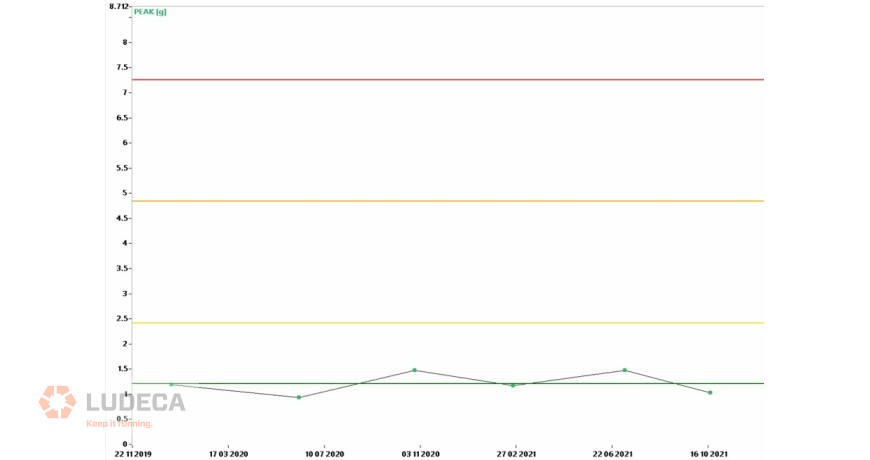
The plot below is a trend taken from the Betavib system indicating the alarm thresholds.
Practical Methods for Setting Alarms
There are a few different ways to go about setting alarms. Some methods for setting alarms can involve some significant mathematics. Other methods can be simple and straightforward.
Linear or Manual Entry
This method of setting alarms is the simplest to understand. Using a Linear or Manual Entry method involves setting an amplitude threshold for a given reading and establishing that as the alarm level. An example of this would be as follows.
- >0.3 in/sec= Alert
- >0.5 in/sec= Danger
If the vibration amplitude of a particular reading crosses that threshold, it is considered “in alarm”. At this point, the status color of the machine changes and alerts are sent out depending on the software’s notification protocol.
This method of setting alarms has some advantages as well as some disadvantages.
Advantages:
- Easy to set
- Easy to understand
- Easily adjusted
- Can be a direct representation of Industry Standards
- Less prone to nuisance alarms
Disadvantages:
- Not Machine Specific (When Applied in Bulk)
- Not as effective for low amplitude defects (When Applied in Bulk)
- Could miss degradation if amplitudes are already high
If you choose to take the Linear or Manual Entry approach, be sure to refer to industry specifications or trained professionals to establish good values to begin with.
Standard Deviation
This approach to setting alarms is based on averages. Over time, trend data can establish a reliable average and normal conditions for individual machines. It would be necessary to have several readings before establishing a standard deviation style alarm strategy.
Standard deviation alarms will alert the analyst if amplitudes increase a certain percentage above the normal level. There are advantages and disadvantages to this approach as well.
Advantages:
- Excellent for catching problems early
- Adapts to each individual machine
- Alerts the analysts of “changes” very quickly
- Very effective for low amplitude vibration
Disadvantages:
- Can alarm on process changes
- Requires several sets of data
- Less effective in the early stages of a vibration program
- Harder to explain to beginners
As with Manual Entry style alarms, it is best to refer to a trained professional when establishing initial alarm levels using standard deviation.
Conclusion
Using alarms can be a beneficial part of any vibration program. When left out of the equation, the analyst is forced to spend a huge amount of time and brain capacity to sift through large amounts of data. Alarms can be a handy tool to assist the analyst and warn of slight changes that could be easily overlooked. As long as alarms are set up and maintained properly, they can greatly increase the accuracy of any vibration program.
Many vibration programs fail because they become too complicated —Keep things simple
Filed under:
Vibration Analysis by Collin Mann