
In Part 1 of this series, alarms were defined and explained in relation to real world vibration programs such as route-based and continuous monitoring. Common parameters to monitor with alarms were also discussed. In this part of the series, we will cover practical application tips as well as some common pitfalls to look out for.
Strategies for Setting Alarms
Setting alarms for the first time, whether your vibration program is brand new or quite old, can be a daunting task. Newer analysts or inexperienced reliability leaders may struggle to guess where the alarm threshold should be set. There are a few ways to approach this.
Take on the task yourself
Some analysts may choose to establish their own thresholds for alarms. Maybe, to begin with, you set a few alarms that are on the higher side. As more data comes in, these levels can be increased or decreased and eventually become more reliable.
Another approach for the “do it yourselfer” would be to use your software to compare a multitude of like readings to establish a safe average to set your first alarms. The image below shows the way I like to throw readings on a plot to get an idea of where alarms should be set. This plot compares velocity readings on four sensors that are monitoring a common gearbox.
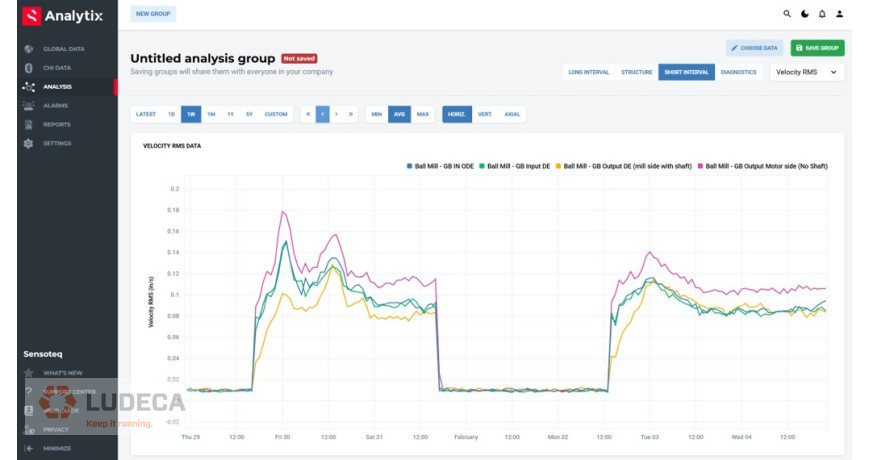
Using your software to your advantage can make quick work of establishing a safe alarm level. This method will take some time but can be very effective.
Hire a Professional
Sometimes it’s a better idea to leave the guesswork to someone with more experience. There are many vibration analysts that would be glad to help you establish some reliable alarms. People like this will be able to make quick work of establishing thresholds to start with based on machine type, size, speed, and other factors.
Analysts who are hired to assist you with an alarm strategy will likely need access to your database to assess the current state of each machine. They may also ask to walk the equipment down and will likely ask for documented details on the equipment. Be prepared to help your trusted professional so he can help you and set you up for success.
If you hire someone to analyze your vibration data on a routine basis, that analyst will likely ask to have control over the alarms. Since they will be responsible for alerting you when problems arise, it only makes sense to let that person establish and maintain their own alarm strategy.
Use Standards to Set Alarms
This is likely the most official and professional way to set alarms, at least to begin with. At first glance, it’s tempting to say “of course we need to use standards”. However, let me warn you of a few things to consider.
There are different standards for different kinds of machines. For example, certain pumps may be best served using ANSI/Hydraulic Institute standards. Basic fans and motors would likely be best suited for ISO 20816/10816. Gas and steam turbine generators would have their own standard, as would reciprocating compressors, multistage blowers, hammermills, etc. It can become very difficult to manage the decision-making process for assigning the correct or best standard for each machine.
The other problem with using standards alone for setting alarms is that most of these will only recommend one or two parameters to establish alarms on. In fact, most of these standards will only give you an Overall Velocity amplitude. Most of the time, this overall is intended to be collected using Root Mean Square (RMS).
Most of these standards will ignore power bands, temperatures, and my absolute favorite, Peak Acceleration. If I had to manage a vibration program with only one alarm, it would be peak acceleration. However, this is a topic for another day.
The most common standard used for General Industrial Machines is the International Standards Organization ISO 20816-3 which was formerly known as ISO 10816-3.
Alarms as Defined by ISO 20816/10816:
ISO 20816 (FKA 10816) does not use the word alarm in many cases. Rather, zones are defined for certain operating conditions. Below is a breakdown of the ISO zones for machine condition.
The amplitude values for each zone depend on the machine type, size, speed, and mounting. Most vibration programs, especially for fans, pumps, and motors will use ISO 10816-3/20816-3, which is for “General Industrial Machines”. You will need to purchase the standard to see the exact values for each horsepower and speed range.
The ISO standard is a great place to start with new programs that do not contain any historical data. This approach also works well for newer analysts that need a firm foundation for setting initial alarms. As the analyst gains experience, he will know how to adjust alarms to accommodate a multitude of common and not so common situations.
Unfortunately, using standards like this in a blanket approach can often lead to having way too many machines in alarm. In some cases, it could even be all the machines! We need to avoid situations like this as much as possible.
Alarm Pitfalls
We can’t discuss vibration alarms without addressing some of the pitfalls that can occur along the way. Alarms can truly make or break a vibration program. Vibration data even in large quantities is no good if we don’t do anything with it. So, having a vibration program with no alarm system creates an inefficient program requiring tons of unnecessary work. However, a program with inaccurate or poorly managed alarms can be just as damaging if not more. The main reason for this is nuisance alarms.
Nuisance alarms
If alarm levels are set too high, they won’t do us any good. If a machine has an advancing defect, but our alarm strategy still calls it good, we have lost the value of the program. On the other hand, if alarms levels are set too low, we will quickly get what we call nuisance alarms. On a route-based program, an example of a nuisance alarm would be an alarm status report that shows red when in fact the machine is just fine. If this then trips a machine or makes production go down, then important faces will also go red with ire. If most of our status reports are red, we aren’t going to fix the problem machines. In this situation the program has also lost its value.
On a continuous monitoring program, a nuisance alarm would be a notification that comes in multiple times a day through text or email. It won’t take long at all for the team to start ignoring these alarms. Once again, the program has lost its value.
So where is the happy medium, where the porridge is neither too hot nor too cold? This is where the program functions optimally and warns you when there’s really a problem and saves you money by catching it early enough to do something to mitigate it efficiently, and also prevents you from unnecessarily wasting your time and money fixing something “that ain’t broke”.
Always keep alarms set to where all notifications are of real value and will be taken seriously.
Set it and forget it doesn’t work
When you finalize your first round of setting your alarms, you may experience a sense of joy and accomplishment. Enjoy that feeling while it lasts, because the work isn’t over. Alarms will continually need adjustment. Thresholds must be constantly adjusted to reduce nuisance alarms as well as catch true problems.
You will need to lower alarms to catch very minor changes such as gear wear, and early bearing defects. These types of defects are typically very low in amplitude and usually use alarms set in certain power bands. As the data comes in, the alarms will need to be lowered over time to effectively catch the minor changes as the defect develops.
Another reason for constant adjustment is the fact that as defects advance, amplitudes rise, and then repairs are made. Throughout the lifecycle of a defect, alarms may need to be slowly increased and then suddenly decreased after a repair is made, and a new baseline is established.
For these reasons alarms cannot be set just one time and remain reliable for a thriving vibration program. Someone will need to champion the alarm strategy and maintain it well. Fortunately, many newer vibration data collectors and software have perfected this process, and modern technology has allowed alarm maintenance to be performed with ease.
Don’t bite off more than you can chew
Some analysts and reliability leaders fall into the trap of trying to bite off more than they can chew. They start an alarm program, and they want to trigger alarms on every parameter known to man. This strategy can lead to an overwhelming number of alarms, especially in the beginning. As the notifications come in and green quickly turns to red, performing analysis can be like drinking from a fire hose.
To begin with, pick a few important parameters to alarm from and move through the process slowly and incrementally. It won’t be long before you find an obvious issue that warrants an alarm. Take it slow and allow the alarms to work for you. This leads us to the final pitfall.
Allow the alarms to work for you. Don’t work for them
Just like anything else in life, vibration software and particularly alarms can become more of a burden than a helpful tool. Alarms and vibration software in general are designed to be a tool that makes your life easier. Some maintenance professionals become a slave to the software instead of simplifying it to increase their efficiency in finding defects.
To avoid working for the software, allow it to work for you by keeping your alarm strategy simple, meaningful, and well maintained.
Alarms can provide a false sense of assurance
Be careful not to fall into the trap of taking a completely black and white view of alarms. There are situations where even machines that are not in alarm can fail. This happens especially when the alarm program is in its infancy. Only the maturest of alarm programs can truly lead to the ability to completely overlook machines that are not in alarm. Be careful not to put too much trust in alarms. They are only a tool.
Conclusion
Now that we have learned some practical ways to set alarms and what to watch out for, be sure to check out Part 3 of this series to see some examples of alarms in use.
Filed under:
Vibration Analysis by Collin Mann